A Free HTTP Client Jetbrains Plugin for the Community Edition
The JetBrains HTTP client is a robust tool built into JetBrains IDEA, enabling developers to test and manage APIs directly within the IDE. However, it’s only available in the paid version of JetBrains IDEA, which creates a barrier for developers who use the free Community Edition or prefer cost-free solutions.
Why Look for Alternatives?
Key reasons developers look for alternatives include:
Cost: The built-in HTTP client is unavailable in JetBrains IDEA Community Edition.
Limited Features: Developers may need specialized features that surpass the default offering.
Customization: Some alternatives provide greater flexibility and tailored solutions.
Accessibility: Free tools are more accessible across teams, eliminating the need for extra licensing and making collaboration easier.
Apidog Fast Request: A Free Plugin for JetBrains IDEA
Apidog Fast Request is a cutting-edge plugin for JetBrains IDEA, designed to streamline the process of API development, testing, and documentation. This free tool empowers users with a suite of advanced features that go beyond basic HTTP client capabilities, offering seamless integration within the IDE.
Key Benefits of Apidog Fast Request:
Free for all users, including those on JetBrains IDEA Community Edition.
Develop and debug APIs in one unified place without switching between tools.
Detecting endpoints in Java/Kotlin projects to generate OpenAPI specifications without additional annotations and populate the request parameters automatically, reducing manual errors.
Designed to streamline API workflows with advanced testing tools.
Regularly updated to meet the evolving needs of developers.
Apidog Fast Request is available for download via the JetBrains Marketplace, making it easy for developers to integrate it into their existing setup.
Key Features of Apidog Fast Request
1. API Debugging
Apidog Fast Request streamlines API debugging with features that save time and enhance productivity:
Detect Endpoints and Send Requests with One Click: Automatically identifies endpoints in Java/Kotlin projects and allows you to send requests instantly with one click, removing the need to switch between your IDE and tools like Postman.
Automatic Request Parameter Filling: Automatically detects Spring framework code to suggest and populate request parameters and URLs, enabling real-time debugging while reducing manual input.
Parsing Various Response Bodies: Formats and highlights responses like JSON and XML automatically, ensuring proper display even for Gzip or Brotli-compressed content.
Request History Backtracking: Keeps a log of URLs, request parameters, and response bodies, making it easy to review and recall past requests.
Global Parameters Management: Simplifies managing shared headers or parameters by allowing you to set up reusable global parameters, such as tokens.
Cookies Management: Manages local cookies easily in a cookie jar, attaching them to requests as needed for seamless operation.
2. API Specification
API Specification Generation: Effortlessly generate OpenAPI specifications without requiring Swagger annotations or code modifications.
Automatic Framework Parsing: Automatically identifies and processes code from popular frameworks like Spring, and Quarkus, while seamlessly detecting RESTful annotations such as
@RestController,@RequestMapping, and@Get.Customizable Configuration: Tailor the tool to your coding style with built-in extensibility and custom rule configurations, all while ensuring minimal intrusion into your workflow.
3. API Documentation
One-Click Upload: Effortlessly upload your generated API specification to Apidog with just a single click.
Effortless Publishing: Create and publish well-structured API documentation instantly using Apidog’s powerful documentation generation features, with customizable options for domains, logos, theme colors, and flexible access controls such as public access, password protection, email whitelists, and IP whitelists.
Versatile Documentation Formats: Apidog Fast Request currently supports generating OpenAPI (Swagger) specifications and will support exporting API documentation in HTML or Markdown format very soon.
Getting Started with Apidog Fast Request
Step 1: Install the Plugin
Open JetBrains IDEA and navigate to File > Settings > Plugins.
Search for “Apidog Fast Request” and click “Install.”
Alternatively, download it directly from the JetBrains Marketplace.
Step 2: Auto-Detect API Endpoints
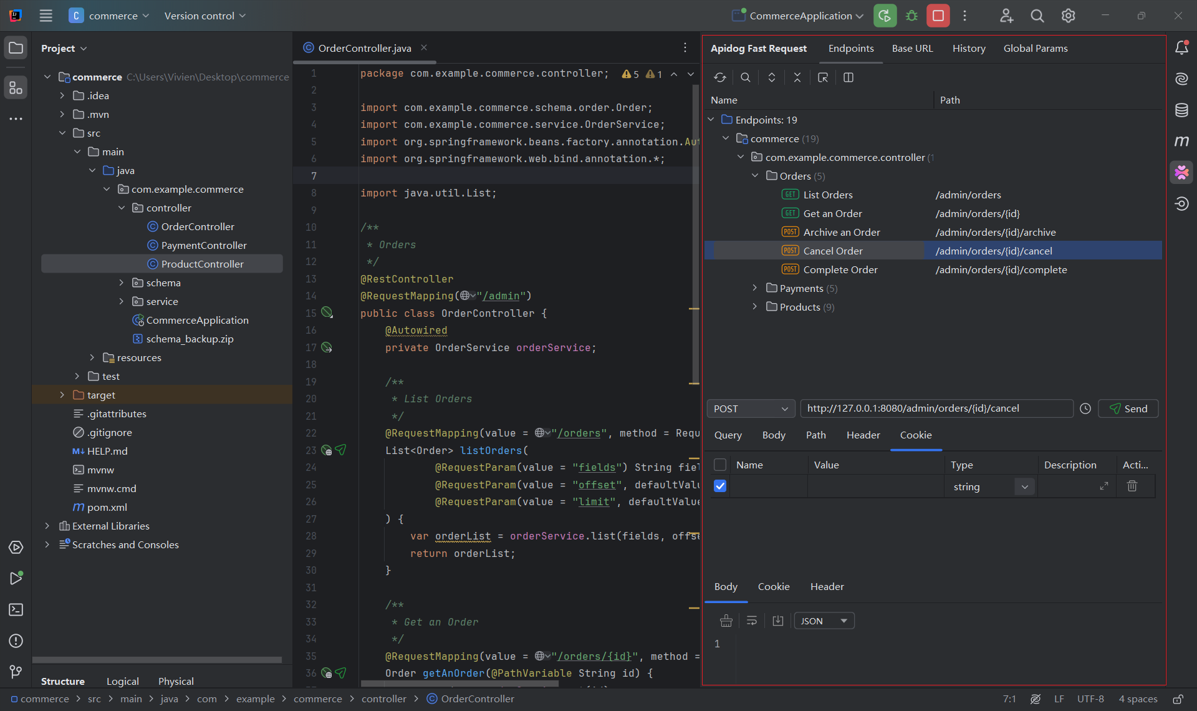
Apidog Fast Request will scan your project, listing endpoints in the right panel with a clear folder structure.
You can test each endpoint and view the formatted API responses for quick debugging.
Step 3: Test Endpoints with One Click
The plugin automatically populates request parameters. You can customize them, along with headers, paths, cookies, and more, and send requests with just one click.
Configure different environments by configuring the base URL under “Base URL.”
Set up reusable global parameters like tokens under “Global Params” for faster API testing.
Manage cookies and check your request history via the “Cookies” and “History” tabs.
Step 4: Upload the Generated API Specification to Apidog (Optional)
Apidog is an all-in-one API development tool designed to streamline the processes of designing, documenting, testing, and managing APIs. You can easily upload your generated API specification from JetBrains IDEA to Apidog using Apidog Fast Request. To do that, follow these steps:
Download Apidog and sign up for an account (if you don’t have an account yet).
Log into your Apidog account, then go to the account settings.
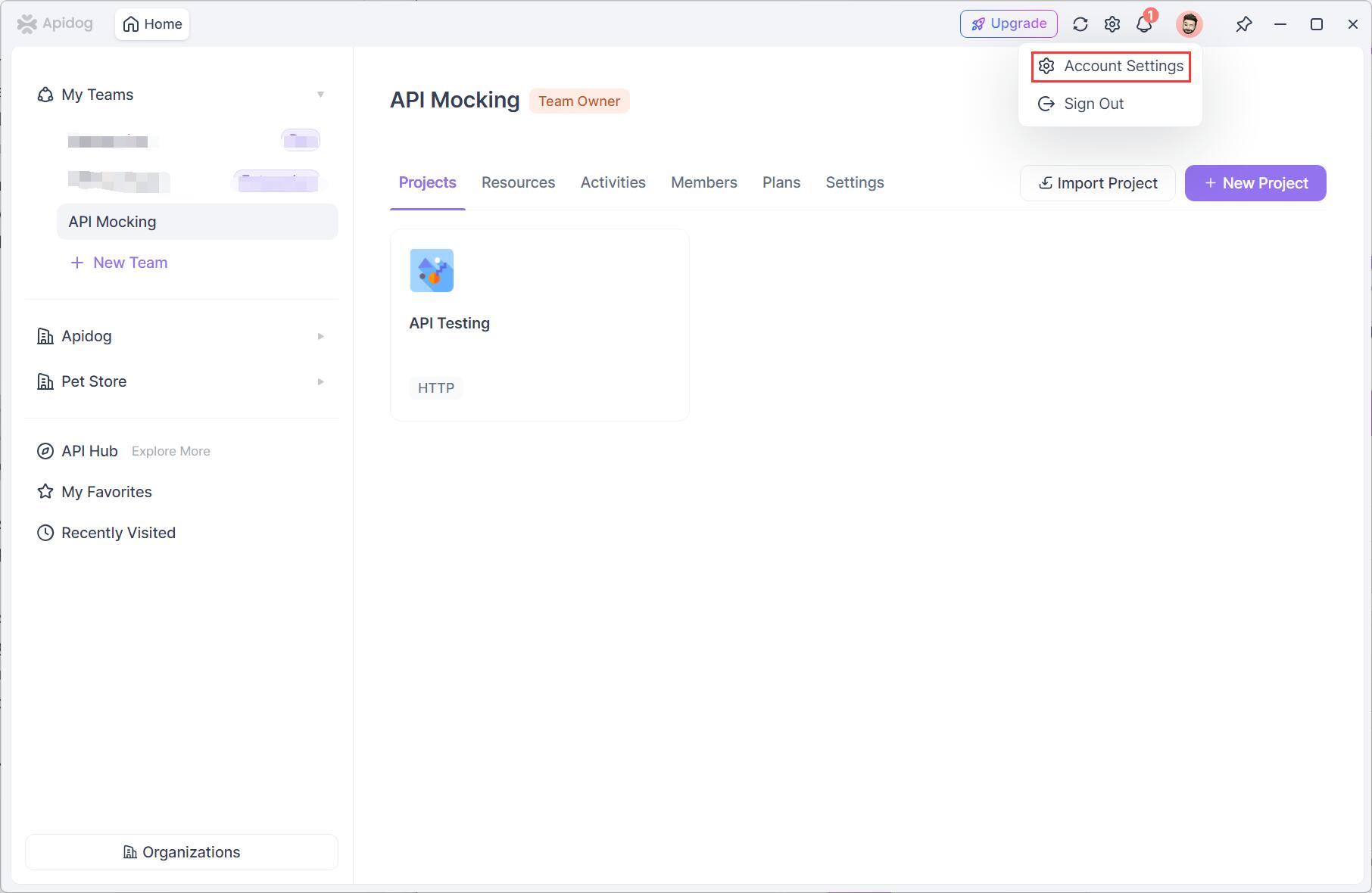
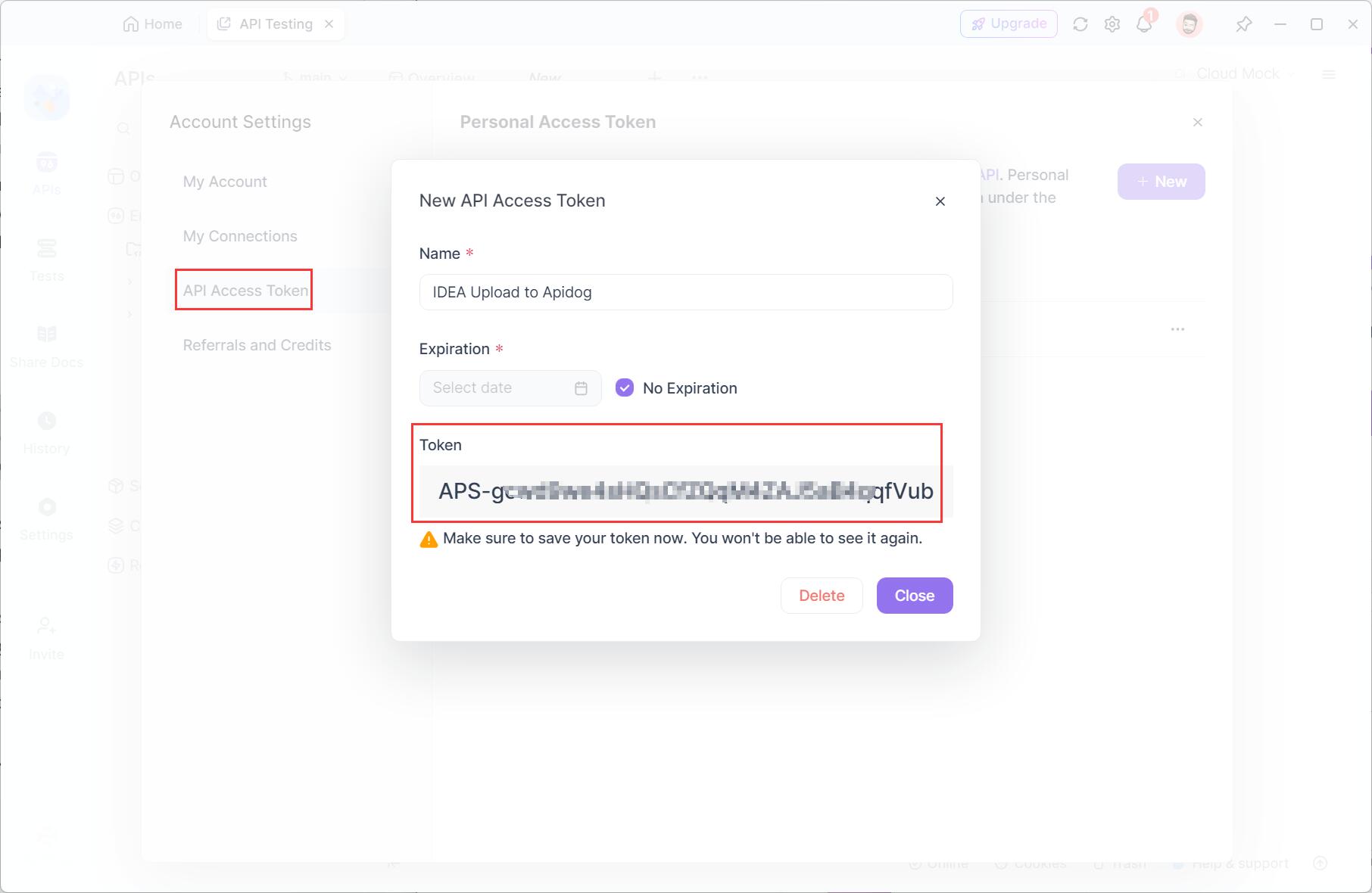
Find “API Access Token” to create a new token. Copy the token.
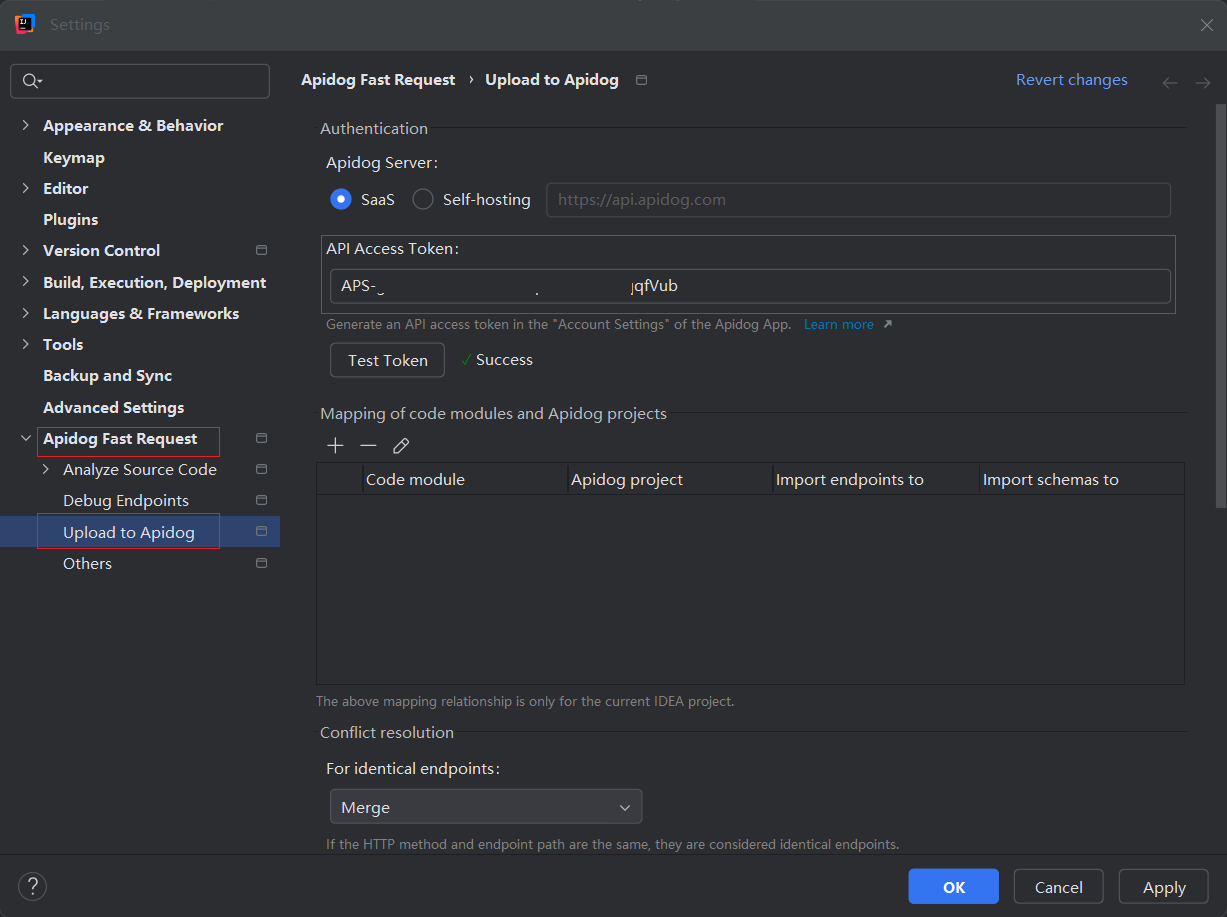
Go back to your JetBrains IDEA. In project settings (Ctrl+Alt+S), find “Apidog Fast Request.” Click on “Upload to Apidog” > “API Access Token.” Paste the copied token and click “Apply.”
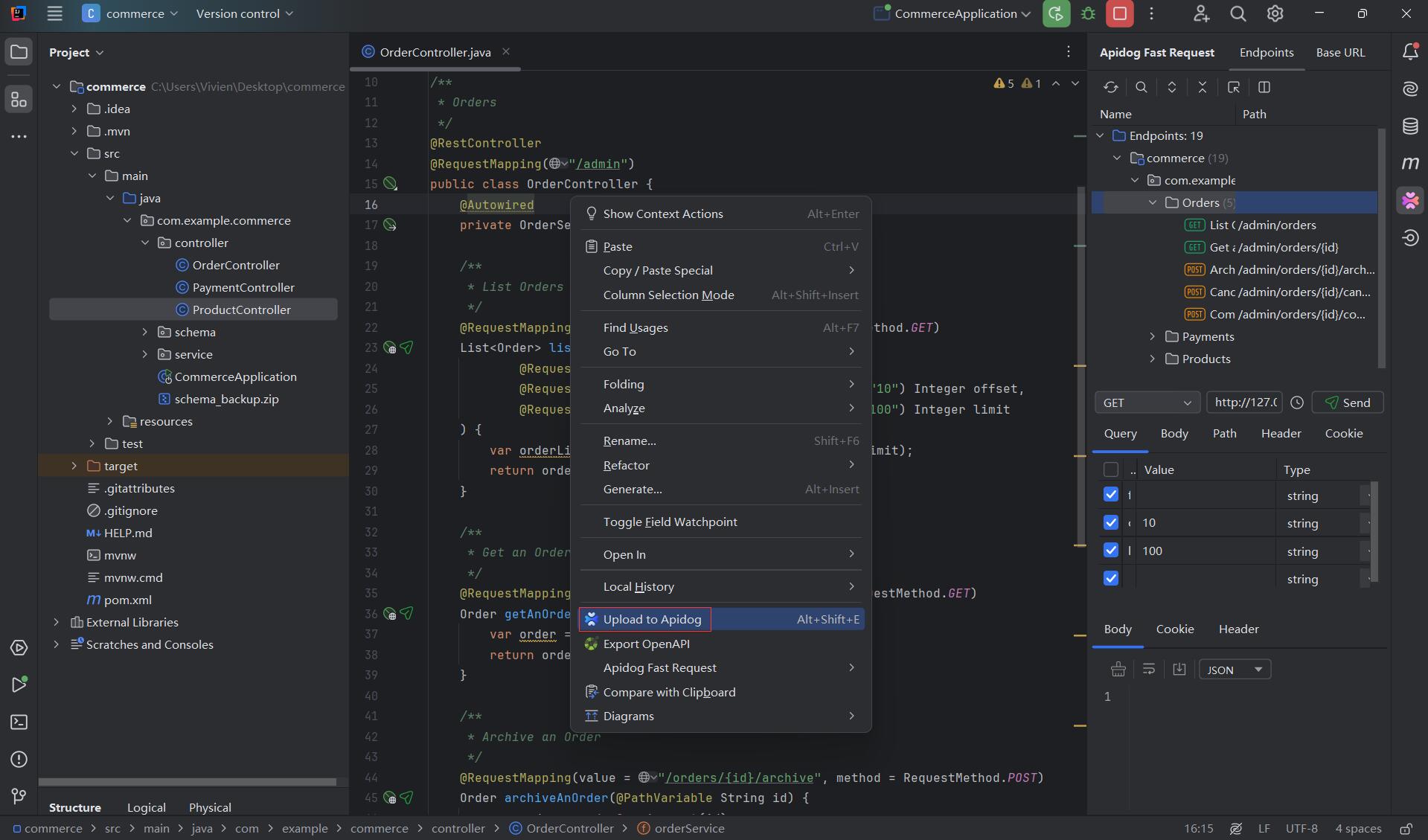
Navigate to your JetBrains IDEA project, right-click and you will see an option “Upload to Apidog.”
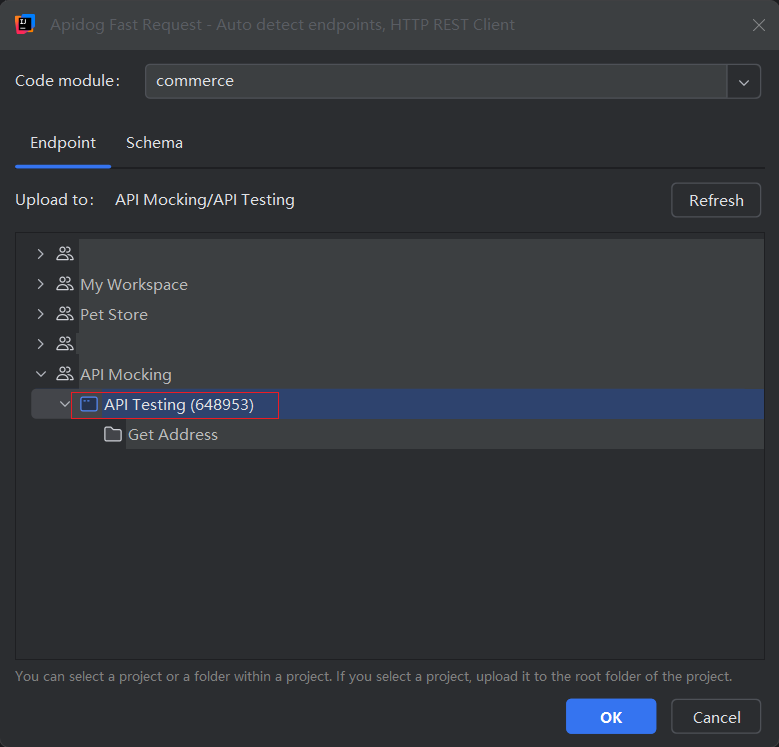
On the pop-out window, choose the upload destination.
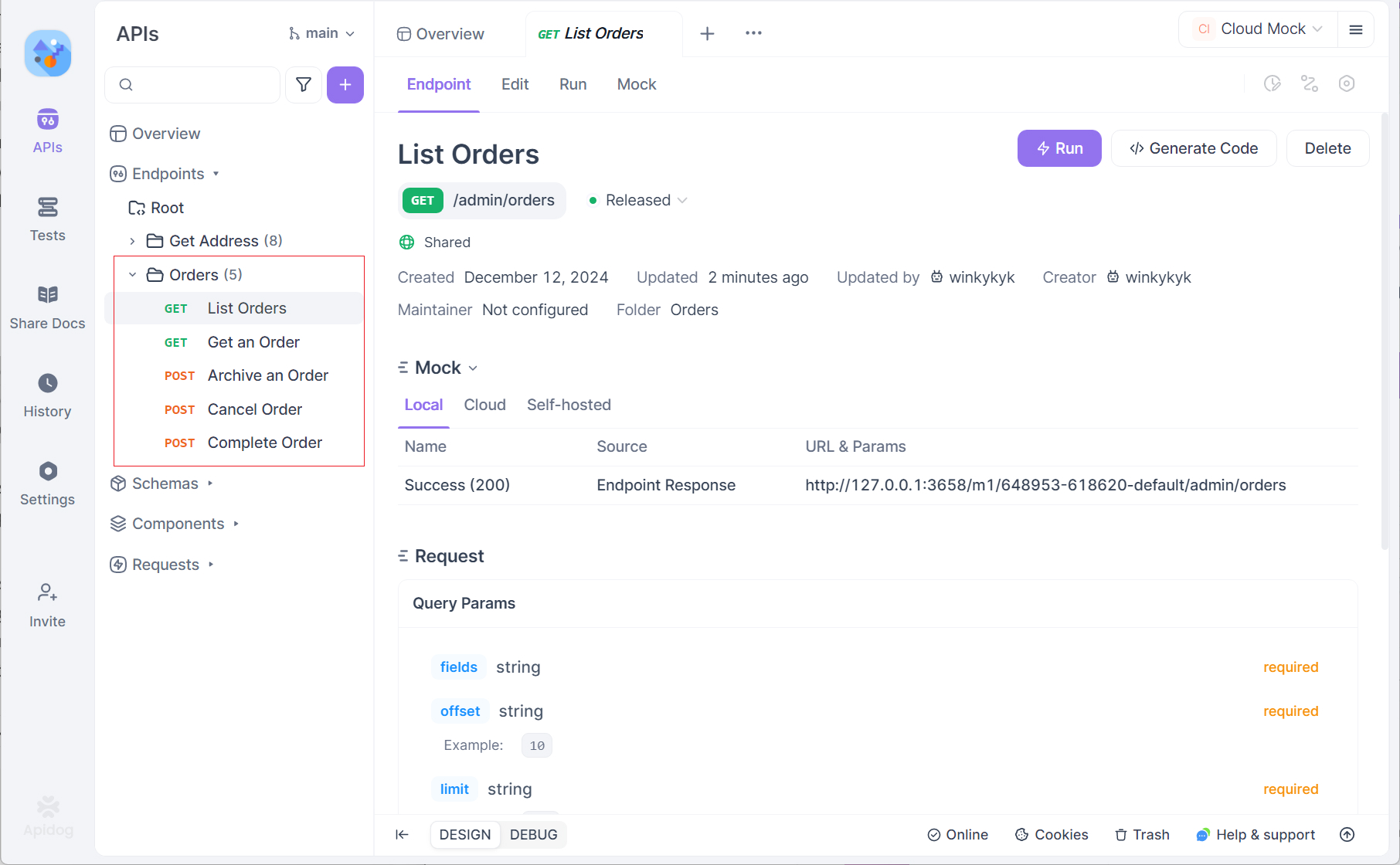
Back to the Apidog app, you will see the endpoint from your IDEA project has been documented with a well-organized structure, and you can publish it online easily.
Step 5: Publish API Documentation (Optional)
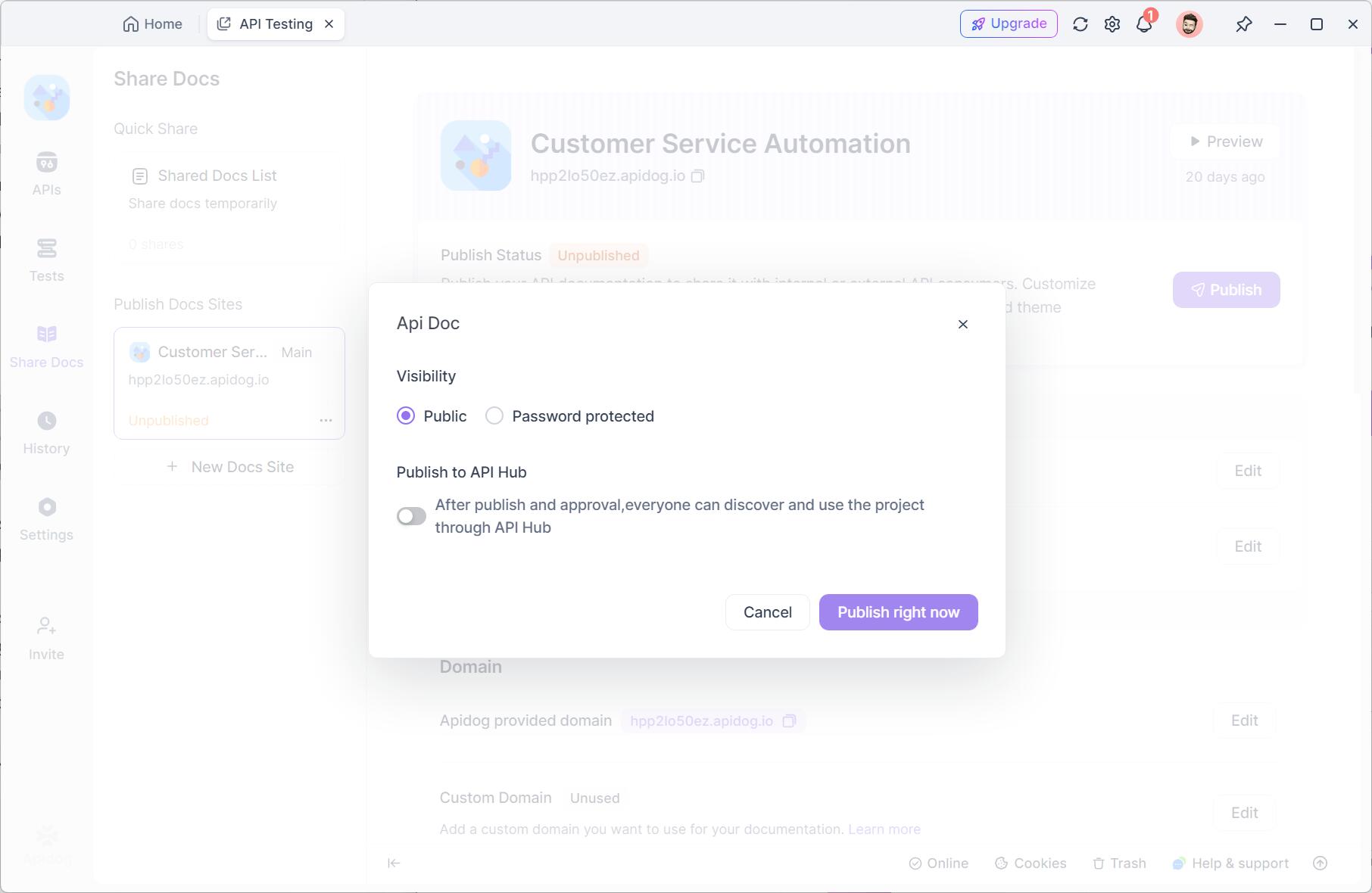
To make your API documentation available online, go to Share Docs within your Apidog dashboard and click Publish Docs Sites.
Customize your domain and any other settings, then hit “Publish right now.”
When published, you’ll get a link that you can share with your team for easy collaboration or with anyone needing access to your API documentation.
Conclusion
Apidog Fast Request is the best free alternative to the JetBrains HTTP Client for developers looking for a cost-effective, feature-rich tool to streamline their API development workflow. With powerful features such as automatic endpoint detection, API specification generation, and seamless integration with Apidog’s documentation platform, Apidog Fast Request ensures that you can manage, test, and document your APIs without leaving your IDE. Whether you’re using JetBrains IDEA Community Edition or the Ultimate Edition, Apidog Fast Request provides all the functionality you need to elevate your development experience.